When importing an EBU (.stl) file, additional options are available to override specific attributes of the source file if they are incorrect. All of these options are disabled by default. It is recommended to enable them only when issues are detected in the imported file, as overriding valid parameters may lead to unintended results.
Note: In EBU STL files, the vertical position of subtitles is determined solely by the line number on which the text is placed. There is no explicit top, center, or bottom vertical positioning defined in the EBU format.
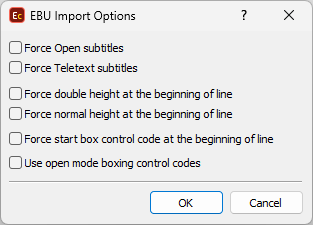
EBU Import Options
Force Open Subtitles |
Override the Display Standard Code (DSC) in the file header. Depending on this code the program interprets the file contents in different ways. |
Force double height at the beginning of line |
Insert Double height or Normal height control codes at the beginning of each line. You can use "Force double height..." if the file is imported with empty lines between the rows. |
Force Start Box control code at the beginning of line |
Insert Start Box control codes at the beginning of each line. Use this option if the text is missing in the imported file. |
Use open mode boxing control codes |
By using this option EZConvert will correctly display the box effect for the subtitles indicated as "boxed" in the input "open mode" EBU file. |
Check for EBU Tech 3264 compliance |
Note: This option is not accessible from EZConvert's GUI, it's available for EZConvert's Command Line, EZConvert Cloud API and EZConvert Watch Folder. When enabled, EZConvert validates parameters in the GSI and TTI blocks of the input EBU STL file against the EBU TECH 3264 specification. If no issues are found, the import/conversion proceeds normally. If issues are detected, EZConvert will either raise warnings or stop the conversion with an error, depending on the severity. A warning is raised if the following parameters do not comply with the specification: GSI Block ▪Language Code (LC) ▪Creation Date (CD) ▪Revision Date (RD) ▪Revision Number (RN) ▪Time Code: Start of Programme (TCP) ▪Time Code: First In-Cue (TCF) ▪Country of Origin (CO) An error is raised if any of the following parameters are incorrect or missing: GSI Block ▪Disk Format Code (DFC) ▪Display Standard Code (DSC) ▪Character Code Table (CCT) ▪Total Number of TTI Blocks (TNB) ▪Total Number of Subtitles (TNS) ▪Total Number of Subtitle Groups (TNG) ▪Maximum Number of Displayable Characters per Row (MNC) ▪Maximum Number of Displayable Rows (MNR) ▪Time Code: Status (TCS) TTI Block ▪Time Code In (TCI) ▪Time Code Out (TCO) ▪Vertical Position (VP) ▪Justification Code (JC) ▪Comment Flag (CF) |